

One of the greatest inventions for the business envelope is the ability to self-seal. This benefit helps businesses everywhere in a few ways.
Another advantage for businesses that use QuickBooks is that there are self-seal envelopes for QuickBooks checks. There is no licking, no using the wet sponge office tool, and no mess for these envelopes.
Types of Self-Seal Envelopes for QuickBooks Checks
There are three types of self-seal envelopes, to be exact, that will comply with the QuickBooks checks standards as well.
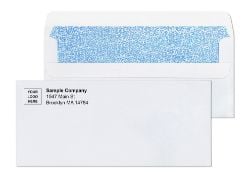
#10 Blank Security Tint Flip and Stick Envelopes
This envelope is easy to use and perfect for any office. They are tinted for confidential reasons. You will no longer have to worry about sending any confidential information through the mail. The tint provides enough cover so no information can be read through the envelope, unlike standard envelopes. You cannot only send checks, but you can also send invoices, statements, and anything else that you wish without worrying about confidentiality.
There is no mess to clean up with these, either. All you have to do is flip and stick to seal the envelope. It is as simple as that.
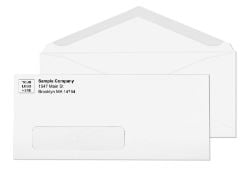
#10 Blank Tinted Flip and Stick Window Envelopes
This envelope is a favorite for many businesses. The size 10 with window is definitely a favorite of secretaries, too, as they do not have to spend extra time creating address labels to where the letter is going. The window will fit the address on the actual letter, creating less work and increasing productivity.
This envelope is tinted as well and provides exceptional confidentiality. Flipping and sealing are added benefits to this envelope as well. No mess and a boost of productivity. What better way is there to send letters?
#10 Printed Security Tinted Flip and Stick Envelopes
These self-seal envelopes are secure and time-saving. You will save time by having these envelopes customized with your address or logo already printed on them. Logos can be uploaded free of charge, so you will not want to miss out on this opportunity.
This type of envelope is mess-free, as the others are, and it is easy to use. It is simple. If you can flip the flap up and seal it, you will have done your job. This product is safe for private information as well. It is important for businesses to keep secure information secure; this envelope does not detract from that.
Which Envelope is Best for My Business
It really will depend on your preference. There are not many differences between these three self-sealing QuickBook envelopes. They all are mess-free and easy to use. They will all get the job done, but you will have to decide if you want your address and/or logo already printed, if you want to deal with labels, or if you want to have a window envelope. Any of these can be used as self-seal envelopes for QuickBooks checks, invoices, or any other type of document you wish to send confidentially.
How Flip-and-Stick and Peel-and-Seal Closures Work
Self-seal envelopes come in two closure mechanisms. Understanding the difference helps you choose the right format for your check mailing workflow.
Flip-and-stick closure
Flip-and-stick envelopes have adhesive on both the inner surface of the flap and the corresponding strip on the envelope body. To seal, fold the flap over and press the two adhesive surfaces together. The bond is immediate, tamper-evident, and requires no moisture and no liner removal. This is the fastest per-piece sealing method for high-volume check runs done by hand.
The flip-and-stick closure is ideal for accounts payable departments that stuff and seal large volumes of checks in one session. The two-surface bond is strong and leaves visible tearing evidence if someone attempts to open the sealed envelope, adding a physical layer of tamper protection to the security tinting.
Peel-and-seal closure
Peel-and-seal envelopes have a paper release liner over the adhesive strip on the inner flap. Peel the liner, fold the flap, press to seal. The liner protects the adhesive from premature bonding during storage or if the envelope passes through a laser printer before sealing. For programs that print directly on the envelope face (return address, logo) before sealing, peel-and-seal is the safer specification because fuser heat from the printer cannot trigger an early seal through the liner.
See the complete range of both formats at self seal envelopes.
★★★★★
"Does the job, no problems so far. I'd get these again"
Jessica | Verified buyer, Double Window Security Check Envelopes Flip and Stick
Source: businessenvelopes.com product page
Single Window vs Double Window: Which Do QuickBooks Checks Need?
Understanding the window configuration is important before ordering self-seal envelopes for QuickBooks checks, because the wrong window setup can misalign with your check template.
Single window envelopes
A single window envelope has one transparent film panel in the lower-left area of the envelope face that shows the delivery address from the document inside. With a single window envelope, you need to print your return address separately on the envelope face, or use a custom-printed envelope with the return address already on it. Single window self-seal envelopes work well for invoice mailings, statements, and correspondence where only one address needs to show through.
See all single window formats at window envelopes.
Double window envelopes for checks
A double window envelope has two transparent panels: one for the payee delivery address and one for the payer return address. Both addresses come from the check face itself, so the envelope needs no additional printing and no labels. For QuickBooks Standard and Voucher checks, the double window format is the correct choice because the check already has both addresses printed in the positions that align with the two windows.
No reformatting of your QuickBooks check template is required. The double window positions on check envelopes are designed to align with the address blocks that QuickBooks, Quicken, and Sage print by default. See the full double window check envelope range at double window envelopes, and the dedicated flip-and-stick check envelope product at Double Window Security Check Envelopes Flip and Stick.
★★★★★
"Great fit. Strong seal. No fuss."
Emily Davis | Verified buyer, Double Window Security Check Envelopes Flip and Stick
Source: businessenvelopes.com product page
How Security Tinting Protects Your QuickBooks Check Mailings
Security tinting is the dense printed pattern on the interior of the envelope that prevents the contents from being read when the sealed piece is held to a light source. Standard white envelope paper is slightly translucent. When a sealed check is held up to a bright light, the payee name, check amount, account number, and routing number can sometimes be partially read through the paper.
Security tinting blocks this completely. The interior pattern, typically a dark crosshatch or geometric design, interrupts light transmission through the paper so that no content behind it is readable from outside the sealed envelope. For check mailings, where every piece contains sensitive financial data, security tinting is the professional standard.
For a complete explanation of how security tinting works and when it is required, see the security tinted envelopes guide.
Comparing Self-Seal QuickBooks Check Envelope Options
| Format | Window | Closure | Custom Print | Best For |
|---|---|---|---|---|
| #10 Blank Security Tint Flip and Stick | None | Flip-and-stick | No | Invoices, statements, high-volume confidential mail |
| #10 Tinted Flip and Stick Window | Single window | Flip-and-stick | No | Invoices and statements with pre-formatted address blocks |
| #10 Printed Security Tinted Flip and Stick | None or single | Flip-and-stick | Yes (logo + address) | Branded check and invoice mailings; professional appearance |
| Double Window Security Tinted Flip and Stick | Double window | Flip-and-stick | Optional | QuickBooks, Quicken, Sage check mailing; no labels needed |
For the complete range of check envelopes, see check envelopes. For all #10 formats, see #10 envelopes.
★★★★★
"Durable, secure, and easy to use, these Flip and Stick double window envelopes are perfect for mailing checks efficiently."
Justin T | Verified buyer, Double Window Security Check Envelopes Flip and Stick
Source: businessenvelopes.com product page
Custom Printing on Self-Seal QuickBooks Envelopes
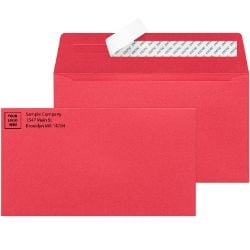
The printed security tinted flip-and-stick envelope adds your company logo and return address directly to the envelope face during manufacturing. This eliminates the return address label step, creates a professional branded appearance on every outgoing check, and saves handling time per piece at volume.
Logos are uploaded at no additional charge. A PDF proof is provided before production begins so you can confirm that the logo placement, return address text, and security tinting all look exactly as expected. Artwork stays on file for reorders, so future orders ship from the same specifications without re-uploading.
Custom printing is available on all self-seal security tinted envelope formats. See all custom options at custom printed envelopes.
Why Business Envelopes for Self-Seal QuickBooks Check Envelopes
Business Envelopes has supplied commercial envelopes to US businesses, nonprofits, and accounting departments since 1997. The self-seal security tinted envelopes in the catalog are manufactured to align with QuickBooks, Quicken, and Sage check formats without requiring any modification to your existing check template.
- No minimums on any order
- Free ground shipping to the contiguous 48 states on every order
- Same or next-business-day production on blank stock
- Custom-printed orders ship within 7 to 10 business days from proof approval
- Logos uploaded free of charge with PDF proof before production
- Security tinting on all check envelope formats for financial privacy compliance